
ApeX Omni referral code save20
Find the official invitation, understand the difference between a fee discount and cashback, and check ApeX’s trading costs before signing up.
Independent affiliate guide. We may earn a commission from referrals. The invitation displays separate discount and cashback fields; the effective account benefit is not verified. Read the evidence.
What does save20 actually offer?
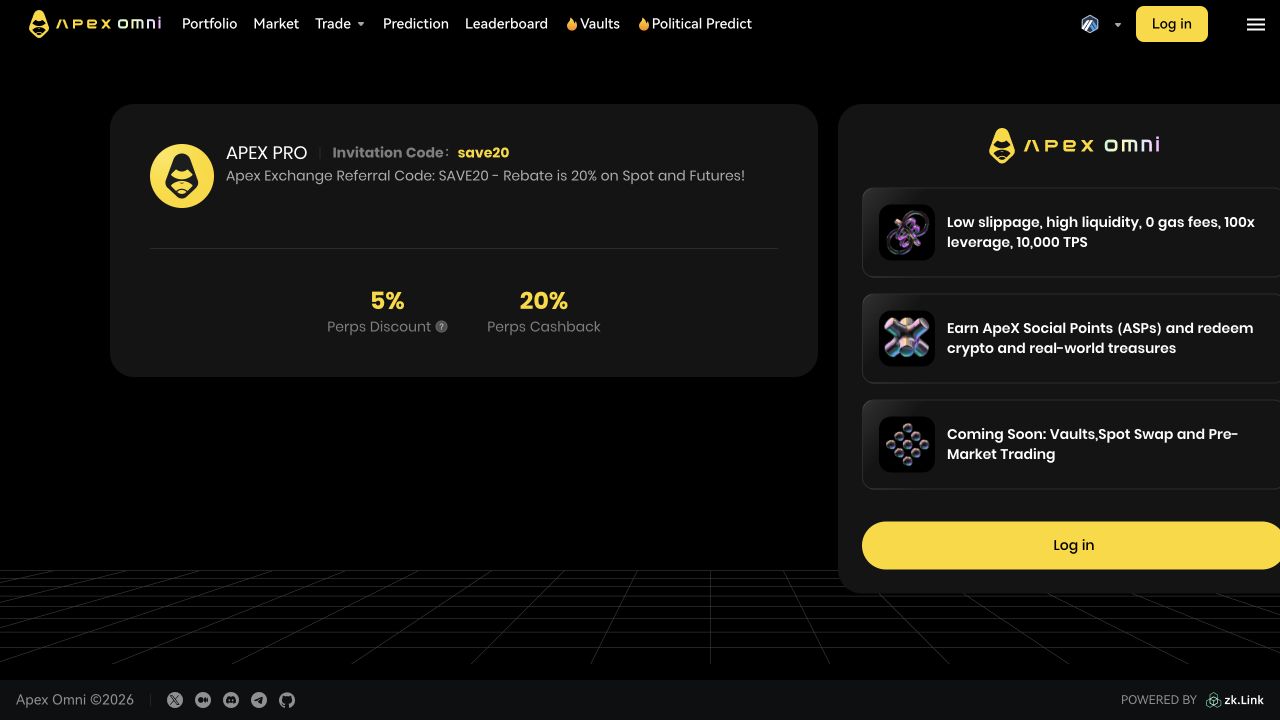
On 18 September 2026, the public ApeX invitation showed two separate fields. These are observations of the invitation page, not a verified account fee or a combined saving.
The invitation also contains legacy product labels. We have not established who receives the cashback, its calculation basis, payout timing or eligibility. Confirm these terms and the fee assigned to your account with ApeX before relying on either figure.
ApeX’s VIP documentation says eligible referral and VIP discounts do not stack; the lower applicable fee takes precedence.
Read the official VIP rulesPublic invitation observed 2026-09-18
- Perps Discount
- 5%
- Perps Cashback
- 20%
- Effective benefit for your account
- Not verified. Do not add these percentages together.
External-wallet deposit networks — check asset and account support
Deposits arrive in the Funding Account; product-account transfers may be required. Check the official deposit guide.
What to check before signing up
An ApeX referral code is also called an invitation code. The important details are the terms attached to your account, not the name of the code.
Check the campaign
The code is save20. Use the official invitation to inspect the current offer and account eligibility.
Understand two different fields
A trading-fee discount and a cashback label are different claims. Neither establishes the other, and they should not be added together.
Check access and risk
A wallet login does not remove geographic restrictions, contract risk or liquidation risk. Read the terms before depositing.
Calculate base trading costs
The published base fee schedule is 0.02% maker and 0.05% taker. Our calculator shows this baseline without assuming a referral benefit.
How to use the ApeX referral code
Use this checklist to confirm the referral terms in your account. Signup is not proof that a particular fee reduction has been applied.
- 01
Open the official invitation
Use the invitation link for code save20 and check that the domain is omni.apex.exchange.
- 02
Read the current terms
Check the displayed offer, geographic restrictions and your eligibility. Do not interpret a cashback label as an immediate trading-fee discount.
- 03
Follow the eligible signup flow
ApeX announced automatic referral binding for new web/H5 accounts on 7 September 2026. Confirm the code is attached in your actual signup flow; native apps and existing accounts may differ.
- 04
Verify your account fee
Before trading, check the assigned maker/taker rates and ask ApeX to clarify any cashback conditions. Keep the account confirmation or fee record as your evidence.
Evaluate ApeX beyond the referral
Use the fee and safety guides to assess the venue alongside the offer. A referral benefit does not establish that a platform is suitable for you.
Order-book execution
Whether an order adds or takes liquidity determines its maker or taker fee. A limit order can still pay the taker rate if it executes immediately.
Understand the custody model
Funds and withdrawals depend on the deployed contracts and operator processes. A wallet connection does not guarantee uninterrupted access.
Check account eligibility
ApeX’s terms restrict access in some jurisdictions. Follow the rules for your location and account; do not use a referral as a workaround.
Compare the full cost
Trading fees are only part of the bill. Compare spread, slippage, funding and transfer costs for the market and size you intend to trade.
Verify the deposit route
Check the supported token, chain, address and withdrawal method in the current app. Do not assume every supported deposit route supports the same exit.
Review current risk evidence
The safety guide separates official claims from independent analysis and explains why audits and withdrawal documentation are not guarantees.
Frequently asked questions
What is the ApeX referral code?
The invitation code shared here is save20 for ApeX Omni, the crypto perpetuals exchange at apex.exchange. This is unrelated to Apex Trader Funding.
How much do I save with save20?
The public invitation observed on 18 September 2026 showed 5% Perps Discount and 20% Perps Cashback as separate fields. We have not verified the effective account benefit or the cashback terms. Do not combine those figures or assume the code name proves a discount.
Where do I apply the referral?
Use the official invitation linked here. ApeX announced automatic referral binding for new web/H5 signups on 7 September 2026. Check your own account; the announcement does not establish the same process for native apps or existing accounts.
Does a referral discount stack with VIP rates?
ApeX’s VIP documentation says discounts do not stack: the lowest applicable fee is used. Confirm your eligibility and actual rate in your account. Referrer commission is also subject to VIP rules.
Is this a verified trading test?
No. This review checks public invitation screens and documentation. We have not completed an account signup, trade or cashback payout to verify the account-level benefit.
Does a wallet login mean anyone can use ApeX?
No. ApeX’s terms include jurisdiction and eligibility restrictions. Check the current terms before registering or depositing; a referral code does not override them.
Is a referral code a safety guarantee?
No. Check that links lead to the official site, inspect wallet requests and review platform risks. Smart-contract, operator, liquidity and liquidation risks are separate from referral terms.
How does this site earn money?
We may receive a commission if you register through our invitation and trade. This is an independent affiliate guide, not a website operated or endorsed by ApeX.
Learn before you trade
Honest, plain-English guides to how ApeX Omni actually works — fees, safety and how it compares.
How to use ApeX referral code save20
The code shared on this site is save20 for ApeX Omni. Use the official invitation link, inspect the campaign and verify the referral and applicable fee in your own account before trading.
Read guideApeX Omni review: what the evidence supports
ApeX Omni is the crypto perpetuals product at apex.exchange. It is distinct from Apex Trader Funding and from the earlier ApeX Pro product. This review examines the current documentation and public referral display rather than treating older product claims as current.
Read guideApeX Omni fees explained
ApeX Omni publishes base perpetual trading fees of 0.02% maker and 0.05% taker. Fees apply to executed notional, not the margin used to open the position. Opening and closing are separate fills, so both contribute to your fee bill.
Read guideCheck the ApeX invitation for save20
Review the current campaign and verify the terms in your account before trading.