
How to use ApeX referral code save20
Reviewed 2026-09-18 · Affiliate Code Research
Evidence, methods and test limits
The code shared on this site is save20 for ApeX Omni. Use the official invitation link, inspect the campaign and verify the referral and applicable fee in your own account before trading.
This walkthrough is based on the public invitation and ApeX’s documentation. It does not claim that we completed a signup, executed a trade or received cashback. The current public display and an account’s actual terms are different evidence.
Key takeaways
- Check that the invitation opens on omni.apex.exchange.
- New web/H5 referral binding was updated on 7 September 2026.
- The observed link contains affiliate and group IDs, not the literal code in its URL.
- A separate cashback field does not prove an immediate fee reduction.
- Existing-account changes and native-app behavior need their own confirmation.
Step 1: inspect the official invitation
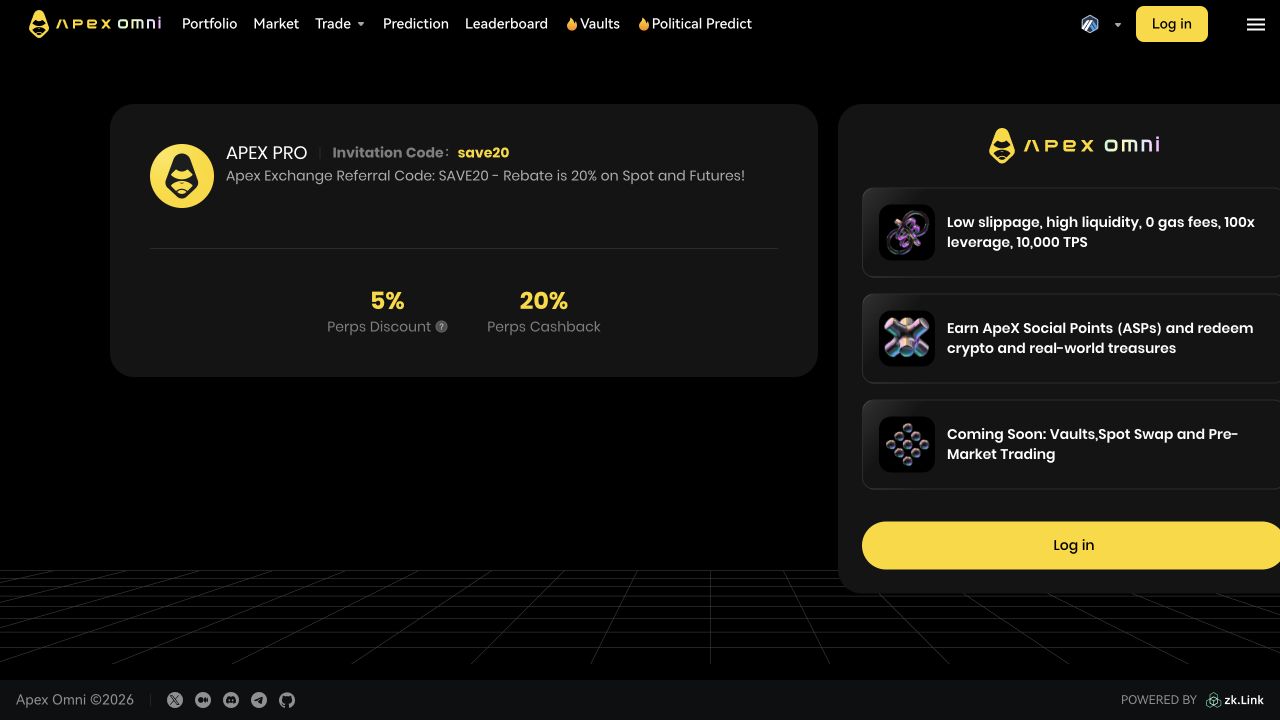
The link on this site opens https://omni.apex.exchange/invitation?affiliate_id=172&group_id=9059. Those parameters identify the referral campaign. The public invitation observed during review displayed save20.
Check the destination domain before connecting a wallet. An invitation URL or a copied code is not a reason to approve an unfamiliar signature, asset transfer or permission request.
Sources: Public save20 invitation (affiliate link) · Invitation screenshot observed 18 September 2026
Step 2: read the offer and eligibility terms
The public save20 invitation observed on 18 September 2026 showed 5% Perps Discount and 20% Perps Cashback as separate fields. It also contained legacy product labels. This does not establish the effective fee or cashback benefit assigned to a new account.
We have not verified the cashback recipient, calculation basis, eligibility or payment timing. Do not add the two displayed percentages together. Confirm the assigned fee and any cashback terms in your account or with ApeX support before relying on them.
Read ApeX’s current access restrictions before registering. A successful wallet connection does not establish that your jurisdiction or account is eligible for every service or campaign.
Sources: Public save20 invitation (affiliate link) · Invitation screenshot observed 18 September 2026 · ApeX: terms of use
Which signup situation applies to you?
ApeX’s 7 September 2026 update covers new accounts created through referral links on web and H5, its mobile web interface. It does not establish the same process for existing accounts or native apps. We have not completed these account flows.
Sources: ApeX: web/H5 referral update, 7 September 2026 · Public save20 invitation (affiliate link) · ApeX: terms of use
- New-account question: Which referral and maker/taker rates are assigned to my account?
- Existing-account question: Is a referral already bound, and may it be added or changed?
- Native-app question: How should I use the save20 invitation in this app version, and where can I confirm the binding?
| Your situation | What the announcement establishes | What to do |
|---|---|---|
| New web or H5 account | Referral binding happens automatically during account creation through the referral link; manual code entry is not required. | Open the official save20 invitation, check eligibility and follow the current flow. Confirm the assigned referral and account fee before trading. |
| Existing account | The announcement does not establish whether a referral can be added or changed later. | Ask ApeX whether your account is eligible for binding or rebinding. Do not assume another wallet avoids existing-account rules. |
| Native mobile app | The announcement names web and H5, not every native-app version. | Check the current app instructions or ask support how referral binding works for your app version and account. |
Step 4: verify the account terms before trading
Check which referral, maker/taker fee and campaign conditions the account actually shows. If the cashback terms are unclear, ask who receives it, which fees form the calculation basis, whether it has caps or exclusions, and when it is paid.
Retain the relevant confirmation and, if you independently choose to trade, the actual fee record. Comparing a documented account rate against a documented baseline is stronger evidence than a marketing label. This site has not performed that account-level verification.
Sources: ApeX Omni: trading and funding fees · ApeX Omni: VIP rules
If the code or offer looks different
Campaign displays can change. A dated screenshot records what was observed, not what is guaranteed at a later visit. If ApeX shows different terms, use the current account-specific confirmation and ask for clarification of any conflict.
This is an affiliate invitation. We may receive a commission if you sign up through the link and trade, subject to the program’s rules. That relationship is disclosed separately from the unverified trader benefit.
Sources: Invitation screenshot observed 18 September 2026 · ApeX Omni: VIP rules
Frequently asked questions
Where do I enter save20?
For new web/H5 users, ApeX announced automatic referral binding through referral links. Follow the current official invitation flow; a particular manual code field is not guaranteed across all apps or accounts.
Does the URL literally contain save20?
The observed invitation URL contains affiliate_id=172 and group_id=9059. The public invitation displayed save20, but the code is not written in the URL itself.
Can an existing account add the code later?
That has not been established by the new-user announcement. Ask ApeX about your account’s eligibility and rebinding rules.
How do I know the actual discount?
Check the assigned maker/taker fee and campaign terms in your account. The public invitation alone does not establish the effective benefit or cashback conditions.
Did this site test a signup and trade?
No. This walkthrough is based on public documentation and an invitation-screen review. Account-level fees and cashback have not been verified.
Sources
Check the save20 invitation
Review the public invitation and confirm your account terms. We may earn a commission if you sign up through our referral link and trade.
View ApeX invitation